![]() |
![]() ![]() |
|
| Diamond Jewelry Forums
|
|||
|
| |
||
» Diamond Prices and Grading »
» RockyTalky
» |
|
![]() |
Image Dome |
![]() |
| P: 5/27/2004 6:37:05 AM | |
johnboystan Rough Rock Total Posts: 1 Last Post: 5/27/2004 Member Since: 5/27/2004 |
We are using an Image Dome system to photograph finished jewellery products for catalogue publication, but the resulting images (taken with Nikon Coolpix) are lacking in contrast and 'sparkle'. We have to spend hours in Photoshop to achieve accceptable results. Any suggestions where we are going wrong?

J P Stanley |
| Posted: 5/27/2004 6:37:05 AM | |
![]() |
There are 4 replies to this message. There are 4 replies on this page. |
![]() |
| P: 5/27/2004 10:02:17 AM | |
|
boonerings Cut Rock Total Posts: 157 Last Post: 8/30/2009 Member Since: 10/31/2003 |
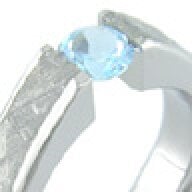
Hi JP. I have an Image Dome, and it does take a lot of experimentation to figure out settings that work well. I don't know what you are trying, so here's what seems to work for me: I use the white plastic plate as the base, and put it on the lowest shelf setting. I set the camera inclination angle to somewhere around 40 to 45 degrees. When photographing rings, I have them stand up by sticking them in some beeswax. I use the white side of the rectangular plastic aperture in the bottom slot of the camera fixture and use the 7X lens in the top slot. The camera itself is mounted low on the adjustable arm, so the bottom is around 1/2 inch away from the lens. I use both side lights at full power and use the overhead light as well. I normally close the dome walls fully, but check the reflections to see if more interesting reflections can be gained by opening them slightly. For camera settings, I use macro mode, center weighted metering mode, flash disable, white balance preset, fine resolution, and manual mode for metering. The exact values for F stop and speed will be dependant on lighting, but I try to adjust the speed or aperture by rotating the handwheel so the exposure display shows around 2 to 3 clicks to the right of center. This makes for a brighter and better contrast picture than if it were centered. A typical speed might be around 1/15 second. Bruce Boone |
| Posted: 5/27/2004 10:02:17 AM | |
| P: 5/27/2004 10:10:24 AM | |
|
boonerings Cut Rock Total Posts: 157 Last Post: 8/30/2009 Member Since: 10/31/2003 |
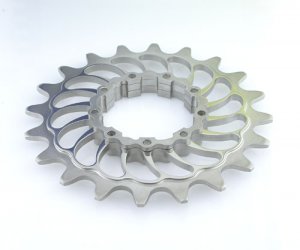
Here's a picture of a reflective part that needed a little more contrast. The titanium would normally just reflect shades of gray, so we held up some colored things to spice up the reflections a little bit. One was a blue 3.5 inch floppy disc, and the yellow was a bit of paper from a legal pad! They were manually held toward the back at the top between the opening in the side doors while the picture was taken. We found that putting them too close to the lights or using translucent colored filters would overwhelm the reflections. They gave a nice contrast to an otherwise pretty plain surface.![]() Bruce Boone |
| Posted: 5/27/2004 10:10:24 AM | |
| P: 5/27/2004 10:35:41 AM | |
|
verticalhorizon Ideal Rock Total Posts: 840 Last Post: 3/24/2006 Member Since: 3/9/2004 |
I'm guessing an Image Dome is expensive, huh? I'm just a consumer and I've started working with the White Balance settings on my Canon A40. It has pre-set options like Tungsten, Flour, Daylight, etc. But they all seem to just increase the white in a picture equally. What am I doing wrong? Also would a shorter or longer exposure time be better? I'm not using a tripod, however. VH (aka GroomZilla) |
| Posted: 5/27/2004 10:35:41 AM | |
| P: 5/27/2004 11:22:30 AM | |
|
boonerings Cut Rock Total Posts: 157 Last Post: 8/30/2009 Member Since: 10/31/2003 |
It seems to me that the Image Dome was somewhere around the $3K to $4K range, which included the camera. It did seem pretty expensive, but the better pictures were well worth it for me. Somewhere along the line, I realized that my pictures are a big part of my living, since I make rings full time now. My rings themselves were a lot better quality than my older pictures showed. The camera also allowed me to see the rings in a whole new light. When first transferred to the computer, they're about the size of a truck tire, so I could see them in a lot more detail. It allowed me to significantly improve my quality by seeing details that I had never seen before. It did take quite a while of adjustments before good pictures were produced. My first ones were very gray and noncontrasting, and a bit of panic set in. I think the white adjustment must be the most important part. On the Nikon, there's some sort of calibration procedure where the camera finds the best setting and remembers it. I don't use a preset for that, as all those ones seem to mess with the color. The exposure times used all seem to have the 'don't shake the camera' icon on, so a tripod can't hurt. Don't mistake me for someone who knows a lot about photography; I learned all I know from the School of Hard Knocks and Electrical Shocks. You just have to try a lot of settings and write them down and hone in on what seems to work better for you.Another thing; I found out the importance of wearing white gloves when doing this kind of close up work! Fingerprints look like zebra stripes at that magnification. Bruce Boone |
| Posted: 5/27/2004 11:22:30 AM | |
|
|
Next Page |
Contact Us | Back Home | Privacy Statement | Forum Agreement | Forum Policies | |
| Ideal BB Version: 0.1.5.4.beta1 | Message forum software powered by the Ideal BB |
Pricescope -
Knowledge -
Diamond Prices -
Tools -
Resources -
About
© 2000-2009 Pricescope. Terms of Use Privacy Policy Disclaimer
forum archives