

PrincessD
Shiny_Rock
- Joined
- Apr 14, 2008
- Messages
- 102
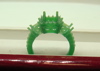
So yesterday I went and took some pics of my three stone princess cut engagement ring. We had it custom made from a ring by tacori that we looked at and also a ring that we saw at helzberg...I just fell in love with the Halo
 around the center..it gives it an unbelievable look. I'm super excited and it should be done this sat.(26th) The ff is picking it up and then its a waiting game for me..not fun
 But I know I'll be super excited when he finally proposes and I see it...It's gonna be a beauty. Btw..it's gonna hold a 1ct., E, VS1 center, the two sides are a total of .77ct,D, VS1 and the rest accent diamonds are about .46ct.













300x240.png)